GatherGear is an already-built rental website for businesses that rent out party and event equipment like tables, chairs, tents, lights, speakers, arches, decorations, and ready-made event packages.
The whole point is to make booking equipment way easier than the usual “send us a message and wait for a reply” setup.
Customers can visit the site, enter their event date and location, browse the available equipment, check the rental price, select how many they need, and add everything to one event cart.
Simple.
They don’t have to keep switching between product pages, writing down prices, or sending five messages just to figure out whether something is available.
---
The homepage starts with a date and location search so customers can begin with the details that actually matter. From there, they can browse the catalog by category, view popular rentals, or open one of the prepared event packages.
The catalog can be organized into categories such as:
tables and chairs
tents
lighting
audio equipment
decorations
arches
linens
and event packages
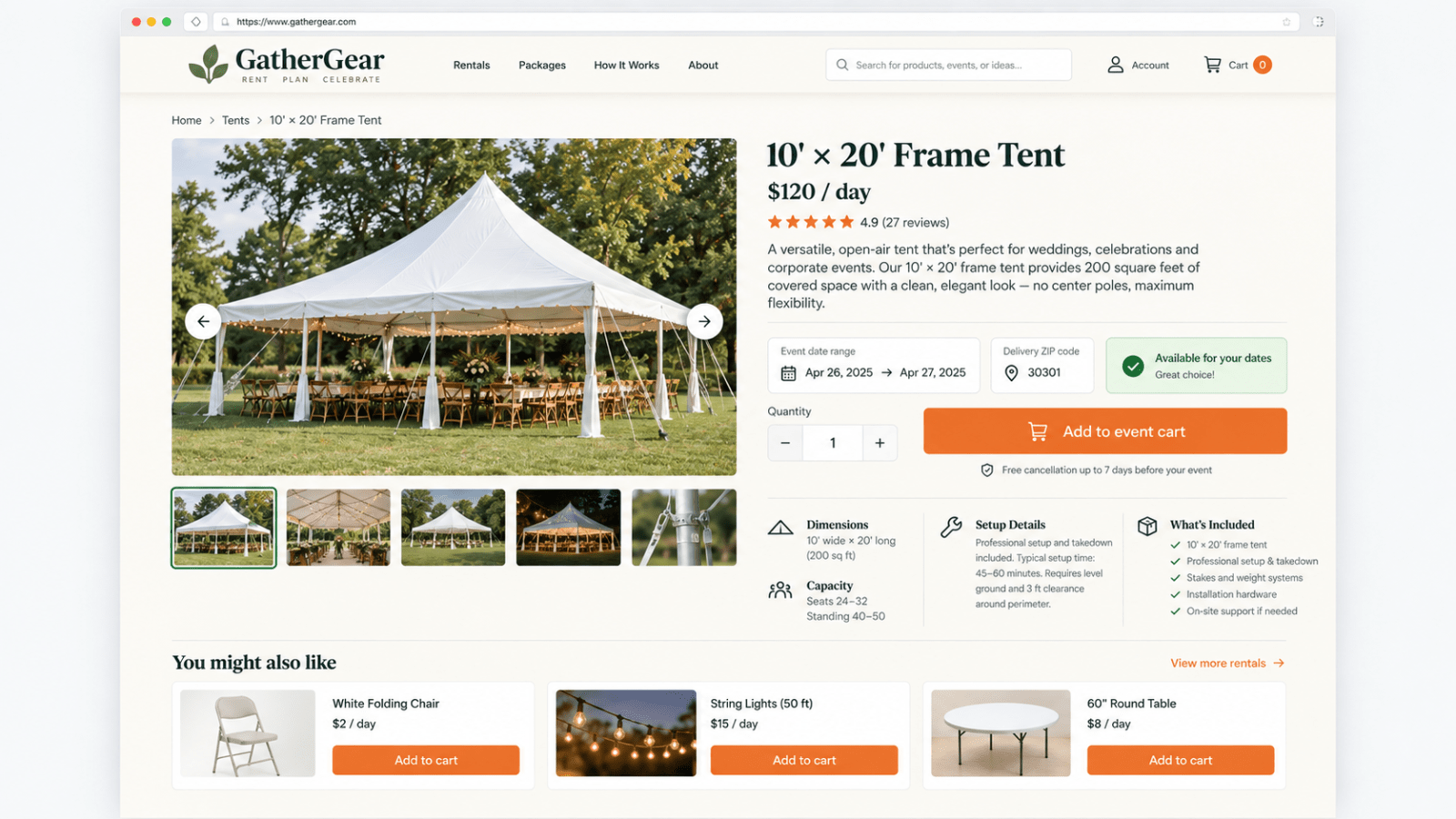
Every rental item gets its own page with pictures, pricing, description, dimensions, capacity, setup information, available dates, quantity selection, and a clear explanation of what comes with it.
For example, someone looking at a tent can see how many guests it holds, how much space it covers, whether setup is included, and what dates it can be rented before adding it to their event.
That saves the business from answering the same basic questions over and over.
The booking system is request-based.
Customers choose their dates, quantities, and rental duration, then add the products they want to the event cart. The cart automatically calculates the item totals, delivery fee, optional damage waiver, and estimated booking total.
Before sending the request, the customer enters their contact information, delivery address, and any setup instructions the rental team should know about.
Submitting the form creates a booking request—it does not automatically charge the customer.
This gives the business a chance to confirm the equipment, delivery area, setup requirements, and final availability before accepting anything. It’s a better fit for rentals where the owner may need to check scheduling, transportation, weather, staffing, or venue access first.
---
There’s also an account area where customers can view the requests they’ve submitted and check whether each one is pending, approved, declined, or completed.
On the business side, rental requests can be reviewed with the customer information, event dates, delivery location, selected products, quantities, notes, and estimated total all together.
Inventory availability updates based on approved bookings, which helps prevent the same equipment quantity from being promised to two different customers for the same dates.
The business can add new products, change rental prices, update quantities, create categories, upload product pictures, disable unavailable items, and edit the information shown on each rental page.
And yep, this is more than just the customer-facing design.
The listing includes the backend setup for user accounts, rental items, categories, carts, date-based availability, booking requests, customer information, and basic inventory management. The information is stored and can be managed instead of disappearing when the page refreshes.
The website also adjusts for desktop, tablet, and mobile screens. Customers can browse and request rentals from their phones, while the larger desktop layout gives more room for product comparisons and cart details.
The current design has a warm event-related style with cream backgrounds, dark-green headings, softer sage details, orange buttons, and large equipment photos. It feels welcoming and practical without looking like some giant national rental company.
The GatherGear name, logo, colors, rental products, prices, categories, images, delivery information, and written content can all be replaced with the buyer’s business details.
It could be used for party rentals, wedding rentals, construction equipment, tools, camera gear, outdoor equipment, bounce houses, catering equipment, or another rental business with a similar booking process.
What you’re getting is the working base shown in the images: the homepage, searchable rental catalog, product pages, date selection, availability checks, event cart, price calculations, booking-request flow, customer accounts, and management tools.
So instead of paying to plan every screen from zero, you can start with the complete rental flow already in place and customize it around the equipment you actually offer.
Customers get a much easier way to plan their rental, and the business gets fewer messy messages asking, “How much is this, and do you have it next Saturday?”