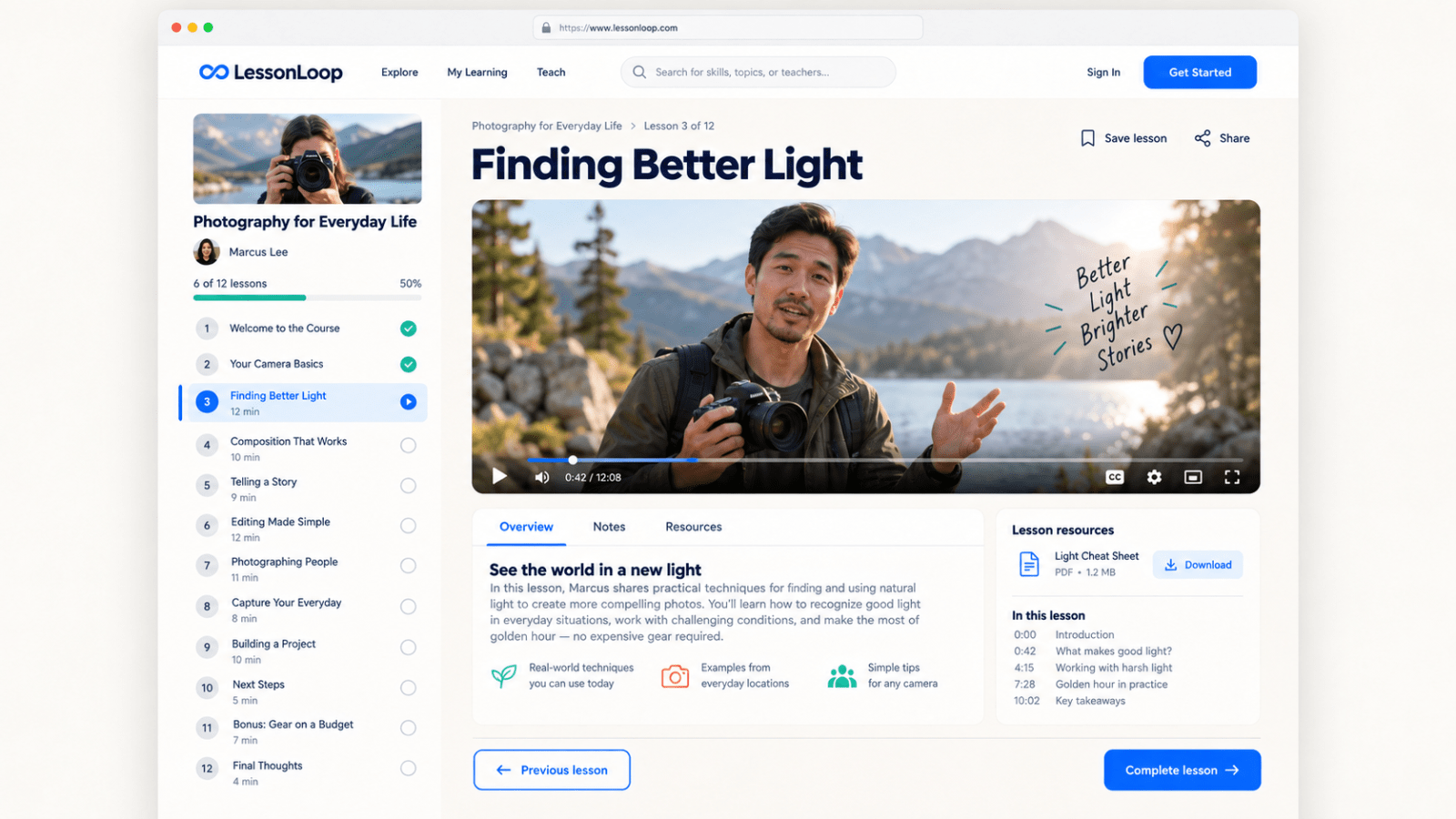
LessonLoop is an already-built online learning platform for creators, coaches, teachers, and small training businesses that want their own place to share courses without everything feeling super corporate or complicated.
It gives students a clean way to find a course, check out the lessons, enroll, and keep track of what they’ve finished. The whole thing is designed to feel friendly and easy to use, so people can actually focus on learning instead of trying to figure out where everything is.
The main idea is pretty simple: you add your courses, organize the lessons, attach the learning materials, and let students move through everything at their own pace.
The public side includes a homepage with featured courses, categories, search, course cards, instructor details, ratings, lesson counts, and course lengths. Visitors can browse around, open a full course page, read what the class is about, check the syllabus, and see exactly what they’re getting before they join.
Once someone has an account, they get their own learning area.
That’s where they can jump back into unfinished courses, see their progress, save courses for later, check weekly learning activity, and keep an eye on their goals. There’s also a learning streak and achievement setup to make the experience feel a little more rewarding without turning the whole site into some over-the-top game.
The lesson player is already laid out too. Students can watch lesson videos, move between chapters, mark lessons as complete, read lesson notes, and download attached resources. The sidebar shows the full course structure and makes it obvious what’s done, what’s currently playing, and what’s still left.
No digging around. No messy menus. Just open the course and keep going.
—
For whoever is running the platform, there’s a course management area where instructors can create courses, divide them into sections, add individual lessons, upload cover images, write descriptions, attach downloadable files, and manage what gets published.
You can use the platform for creative classes, business training, fitness education, staff onboarding, coaching programs, skill-based tutorials, or pretty much any setup where people need to work through organized material online.
The current design uses a warm off-white background, deep navy text, bright blue buttons, and a few coral and mint details. It looks modern, but it still has some personality. It doesn’t feel like a cold school portal, and it doesn’t feel like a random template with the logo swapped out either.
It’s also responsive, so the layout adjusts for desktop, tablet, and mobile screens. The desktop experience gets the most space, while the smaller layouts keep the important stuff easy to reach without cramming everything together.
One thing to know: the platform currently handles the course experience itself, but paid checkout isn’t part of the standard listing. Courses can be displayed as free or paid, and enrollment access can be managed, but connecting Stripe or another payment provider would be handled separately.
Same deal with video hosting. The lesson player can use video links from a supported provider, but this listing doesn’t include a paid video-hosting account or unlimited storage for huge video files.
Basically, the hard part is already there.
You’re not starting with a blank page and trying to explain every screen from scratch. The course catalog, course details, student dashboard, progress tracking, lesson flow, saved courses, goals, and instructor tools already work together as one product.
I can replace the LessonLoop branding with your business name, colors, logo, course content, and images so the finished version actually feels like yours.
If you’ve been wanting to launch a small course platform but don’t wanna spend months building every little piece from zero, this is a solid head start. You get a full working foundation, a consistent design, and enough flexibility to turn it into something specific to your audience instead of being stuck with the demo content forever.