 Web Application
Apex Whatsapp
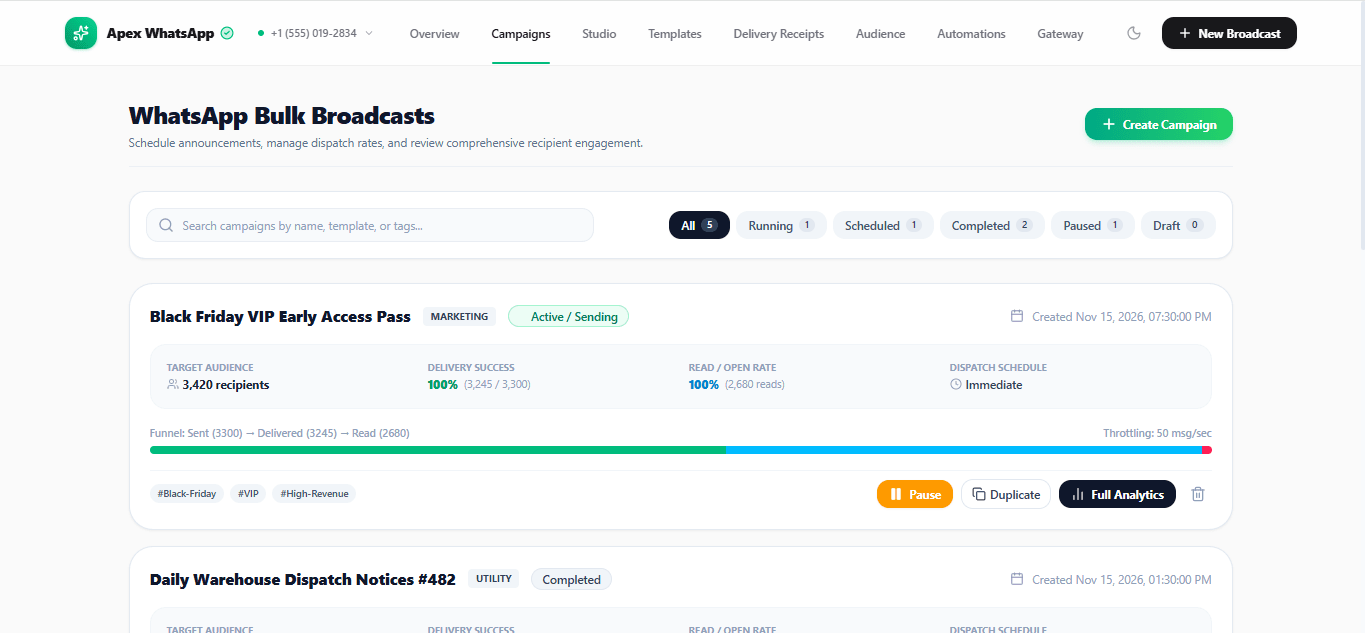
WhatsApp Business Campaign Manager is an enterprise-grade communication and campaign management platform designed to streamline business messaging through Meta’s official WhatsApp Cloud API. It enables organizations to create, personalize, schedule, and manage large-scale WhatsApp campaigns while providing comprehensive delivery tracking, audience management, and real-time webhook monitoring through a centralized interface.
Core Features & Capabilities
1. Automated Campaign Management & Scheduling
- Create, configure, and schedule bulk promotional and utility message campaigns.
- Personalize messages using dynamic parameters and recipient-specific data.
- Implement configurable rate-limit throttling (10–100 messages per second).
- Support quiet hours and scheduled delivery controls.
- Manage campaign execution and monitor delivery progress.
2. Interactive Message Preview Studio
- Provides a simulated mobile device interface for real-time message previews.
- Supports dynamic template parameter mapping using placeholders such as `{{1}}` and `{{2}}`.
- Preview rich media headers, including images and other supported media.
- Configure interactive call-to-action buttons, including website URLs, phone numbers, and quick replies.
- Validate message presentation before campaign execution.
3. Delivery Tracking & WAMID Audit System
- Monitor individual message delivery statuses throughout the messaging lifecycle.
- Display WhatsApp-style status indicators:
- Sent (✓)
- Delivered (✓✓ Grey)
- Read (✓✓ Blue)
- Track delivery latency and message-processing performance.
- Record WhatsApp Message IDs (WAMIDs) for message-level auditing.
- Display Meta API error codes and diagnostic information, including errors such as `131026`.
4. Audience Management & Compliance
- Maintain a centralized contact directory using international E.164 phone number formatting.
- Manage subscriber opt-in and opt-out preferences.
- Support STOP-based unsubscribe handling.
- Import bulk contact lists through CSV files with automated column mapping.
- Organize audiences for targeted campaign distribution.
5. Official Meta Webhook Integration
- Includes a webhook verification endpoint supporting Meta's GET challenge handshake.
- Processes incoming POST webhook events.
- Receives message delivery and read-status callbacks.
- Supports incoming customer replies and real-time event processing.
- Provides an integration layer for connecting internal business systems with WhatsApp Cloud API services.
Target Audience & Business Applications
E-Commerce & Retail Businesses
- Promote flash sales, product launches, discounts, and restock announcements.
- Engage customers through segmented subscriber lists.
- Distribute promotional and transactional notifications.
Logistics & Operations Teams
- Automate order confirmations and shipment notifications.
- Share delivery tracking links and operational updates.
- Send appointment reminders and service notifications.
Digital Marketing Agencies
- Manage WhatsApp campaigns for multiple business clients.
- Coordinate multi-number WhatsApp Business Account (WABA) operations.
- Monitor messaging limits and campaign performance.
- Generate detailed CSV reports for auditing and analysis.
Developers & Technology Teams
- Integrate WhatsApp messaging into existing applications and business workflows.
- Connect internal systems through API endpoints and webhook infrastructure.
- Automate transactional and customer communication processes.
Platform Value Proposition
WhatsApp Business Campaign Manager provides a centralized environment for managing business messaging operations, campaign scheduling, subscriber administration, delivery monitoring, and Meta webhook integrations.
By combining campaign orchestration, interactive message previews, message-level auditing, and audience compliance management, the platform aims to simplify WhatsApp-based customer engagement for businesses, marketing agencies, and technology teams.
Technology used
- React
- TypeScript
- Node.js
Preview the live product
Open the live product to review its main flows and experience before starting an order.
Open live productWhat's included
✓
Source Code
✓
README
✓
Property Rights
What's not included
—
NIL